

























Fox News Flash top headlines for May 24
Fox News Flash top headlines are here. Check out what's clicking on FoxNews.com.
You've seen CAPTCHA checks everywhere. You click a box. You move on. No big deal. Now imagine that same box asking you to press a few keys on your keyboard. It might tell you to open a command window and paste something. It feels a little odd. Still, the page looks real.
That is exactly what scammers are counting on. A new warning from the Identity Theft Resource Center highlights a growing scam that turns a basic security check into a malware trap.
Sign up for my FREE CyberGuy Report
- Get my best tech tips, urgent security alerts and exclusive deals delivered straight to your inbox.
- For simple, real-world ways to spot scams early and stay protected, visit CyberGuy.com – trusted by millions who watch CyberGuy on TV daily.
- Plus, you'll get instant access to my Ultimate Scam Survival Guide free when you join.
META ACCOUNT SUSPENSION SCAM HIDES FILEFIX MALWARE
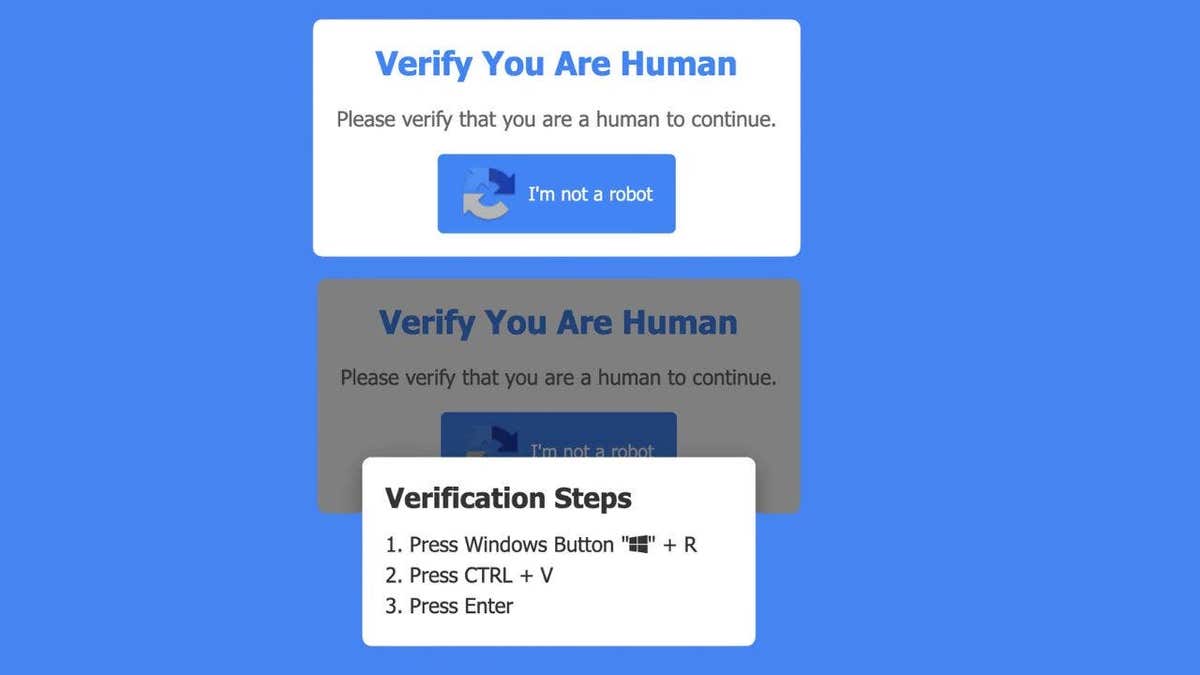
This fake CAPTCHA looks legitimate at first, but the moment it asks you to press keyboard shortcuts, it turns into a malware trap. (Kurt "CyberGuy" Knutsson)
How the fake CAPTCHA scam works
This scam flips a familiar process into something dangerous. Here is what happens:
- You land on a website that looks normal
- A CAPTCHA box appears, asking you to verify that you are human
- Instead of clicking images, you get instructions
- The page tells you to press Windows + R
- Then press Ctrl + V and Press Enter
At that point, the damage is already underway. Those steps open a hidden Run window on your PC. A malicious script is already copied to your clipboard. When you paste and execute it, you install malware without realizing it. No download button. No warning screen. You did it yourself.
TOP 5 SCAMS SPREADING RIGHT NOW

Many people encounter these scams during everyday browsing, often while distracted or multitasking on their devices. (Kurt "CyberGuy" Knutsson)
What gets installed on your computer
Security researchers say this scam often delivers StealC malware. This type of malware works quietly in the background. It looks for anything valuable and sends it to attackers. That can include:
- Saved passwords
- Browser login sessions
- Autofill data
- Cryptocurrency wallet details
Because it runs silently, many people have no idea anything is wrong until accounts start getting accessed.
Why is this trick so effective?
This scam works because it feels familiar. People trust CAPTCHA prompts. They see them on banking sites, shopping pages and login screens. That trust lowers your guard. It also avoids the usual red flags. There is no suspicious download. No pop-up warning. No obvious scam message. Instead, it gives you instructions. Simple steps. Follow them, and you bypass your own security.
A real CAPTCHA will never do this
This is the key takeaway. A legitimate CAPTCHA will never:
- Ask you to open a command window
- Tell you to use keyboard shortcuts like Windows + R
- Instruct you to paste or run commands
If you ever see that, close the page immediately.
What this means for you
This scam shows how fast online threats are evolving. You can do everything right. Avoid bad links. Ignore suspicious emails. Still, a single moment of trust can lead to a full compromise. That is why scams like this are so dangerous. They target behavior, not just technology.
HOW 1 MAN GOT SCAMMED IN SECONDS USING GOOGLE
Once the malicious command runs, attackers can quietly access sensitive data like passwords and login details without you noticing. (Kurt "CyberGuy" Knutsson)
Ways to stay safe from fake CAPTCHA scams
Start with awareness. That alone stops most attacks. Here are practical steps that make a real difference:
1) Never follow keyboard instructions from a website
If a page tells you to open Run or paste a command, leave immediately.
2) Close the page instead of interacting
Do not try to "fix" it. Do not click anything else. Just exit.
3) Use strong antivirus software
Security tools like strong antivirus software can catch malware even if it gets installed. Get my picks for the best 2026 antivirus protection winners for your Windows, Mac, Android and iOS devices at CyberGuy.com.
4) Consider using a data removal service
Scammers often pair stolen data with information from data broker sites. A data removal service can help reduce your exposure and limit follow-up scams. Check out my top picks for data removal services and get a free scan to find out if your personal information is already out on the web by visiting CyberGuy.com.
5) Keep your system updated
Updates patch vulnerabilities that malware often exploits.
6) Change passwords if you think you were exposed
Use a separate device to update your accounts and consider using a password manager to create and store strong, unique passwords for each account. Check out the best expert-reviewed password managers of 2026 at CyberGuy.com.
7) Watch for unusual activity across your accounts
Look for login alerts, password reset emails or transactions you do not recognize.
What to do if you ran the fake CAPTCHA commands
Act quickly. Time matters here.
- Disconnect your computer from the internet
- Run a full antivirus scan
- Change passwords from another device
- Enable two-factor authentication (2FA) on key accounts
The sooner you respond, the better your chances of limiting damage.
Kurt's key takeaways
Scammers are getting smarter about how they trick people. They are not relying on obvious phishing emails anymore. They are blending into everyday online habits. That simple CAPTCHA box you have clicked hundreds of times now carries risk if it behaves differently. Trust your instincts. If something feels off, it probably is.
If a website asked you to press a few keys to prove you are human, would you hesitate or follow along without thinking? Let us know by writing to us at CyberGuy.com.
CLICK HERE TO DOWNLOAD THE FOX NEWS APP
Sign up for my FREE CyberGuy Report
- Get my best tech tips, urgent security alerts and exclusive deals delivered straight to your inbox.
- For simple, real-world ways to spot scams early and stay protected, visit CyberGuy.com – trusted by millions who watch CyberGuy on TV daily.
- Plus, you'll get instant access to my Ultimate Scam Survival Guide free when you join.
Copyright 2026 CyberGuy.com. All rights reserved.
